Get started
Licence and plans
Relay starts with a 30-day trial with everything switched on. After that it runs on Free unless you enter a licence key. Paid is a monthly subscription: each month you pay, your licence runs for another month.
What each plan includes
| Free | Trial, Paid and Implementation | |
|---|---|---|
| Agents | 1 | As many as you need |
| 100 a month | No limit | |
| Skills | The starter library plus 3 of your own | No limit |
| Connections and tools (Power BI) | No | Yes |
| Scheduled reports and weekly checks | No | Yes |
| Templates and playbooks on this site | No | Yes |
Implementation is the plan for businesses we set Relay up for. It includes everything in Paid. See Pricing.
Get your key
- Sign in to your account on this site.
- Copy the licence key with Copy key. It starts with
RELAY1. - In Relay, open Settings > Licence, paste it and press Use this key.
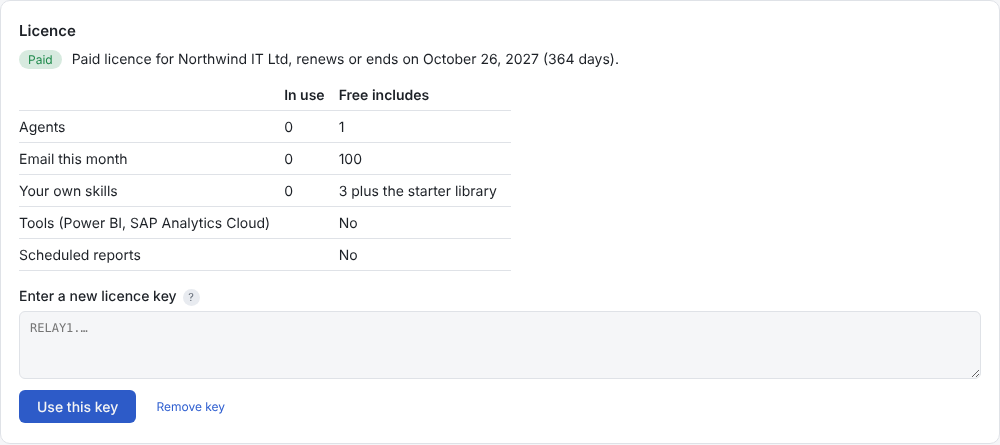
You can also paste it in the Plan step of the setup wizard.
When a trial or licence ends
Nothing is deleted. Relay moves to Free and pauses the extras:
- Agents after the first stop taking new email. Their email goes to Global, and the agents are kept exactly as they are.
- Scheduled reports pause, and the Overview says so.
- Email after the month's 100 goes to Cases for a person to handle, without using the AI.
- Work already under way finishes. You can always read your history and approve replies that are already drafted.
Renew or enter a new key and everything carries on where it stopped.
Checks and going offline
The key is checked on your PC, so it works without the internet. About once a week Relay also checks it with this website, which is how renewals and upgrades reach your PC: you don't need to paste a new key after you upgrade.
If Relay can't reach the website for a while, it keeps working. After about three weeks without a successful check it runs on Free until it can connect again. Turning the PC's clock back doesn't add days.
The check sends only the key, a scrambled code for the PC (which can't be turned back into anything about the PC), Relay's version and the PC's name, which appears on your account page so you can tell your PCs apart. No email or business data is ever sent to us.
Moving to a new PC
Each plan allows a number of PCs. Remove the old one under PCs using this licence on your account page, then enter your key on the new PC.